

Gemini 3 Flash in ChadGPT – A Little Faster, A Lot Smarter

You’re busy running a business, not a research lab. You need answers that are accurate, fast, and, ideally, don’t require a manual to understand. We’ve made two quick updates to the AI Assistant to make your workday move just a little bit smoother.
1. Gemini 3.0 Flash is Now the Default
We swapped out the old engine (Gemini 2.5) for the shiny new Gemini 3.0 Flash.

Why you’ll care:
- Speed: It’s called “Flash” for a reason. You’ll spend less time watching the loading dots and more time actually using the output.
- Better Context: It’s smarter at understanding what you’re actually asking for, meaning fewer “let me rephrase that” moments.
- Efficiency: Whether you’re drafting an email or summarizing a long transcript, it hits the mark faster so you can get back to your real job.
2. What about Pro?

Sometimes your “to-do” list involves more than just a quick response. Sometimes you’re knee-deep in a complex business plan, analyzing a 50-page PDF, or trying to solve a logic puzzle that would make a CPA sweat.
For those moments, look under the “AI Reasoning” tab and meet Gemini 3.0 Pro.
Think of it this way:
- Gemini 3.0 Flash is your high-speed courier. It’s built for agility and getting the job done now.
- Gemini 3.0 Pro is your senior consultant. It’s designed for deep thinking, massive amounts of data, and complex problem-solving.
Why you’d switch to Gemini 3.0 Pro:
- Heavy Lifting: If you’re asking the AI to process an entire project’s worth of context or write a detailed technical guide, Pro has the “brain capacity” to keep track of every detail without getting distracted.
- Deep Reasoning: When combined with our new Thinking Process display, you can watch Pro dismantle a complex problem piece by piece. It’s perfect for when you need to be 100% sure the logic holds up.
- The “Big Picture” Tasks: Use it for strategic planning, deep research, or when you’re building out a new workspace in ChadGPT Teams.
3. We’re Showing the “Thinking Process”
Ever wonder how the AI got from your prompt to its answer? Instead of just giving you the finished product, the AI Assistant now displays its Thinking Process.
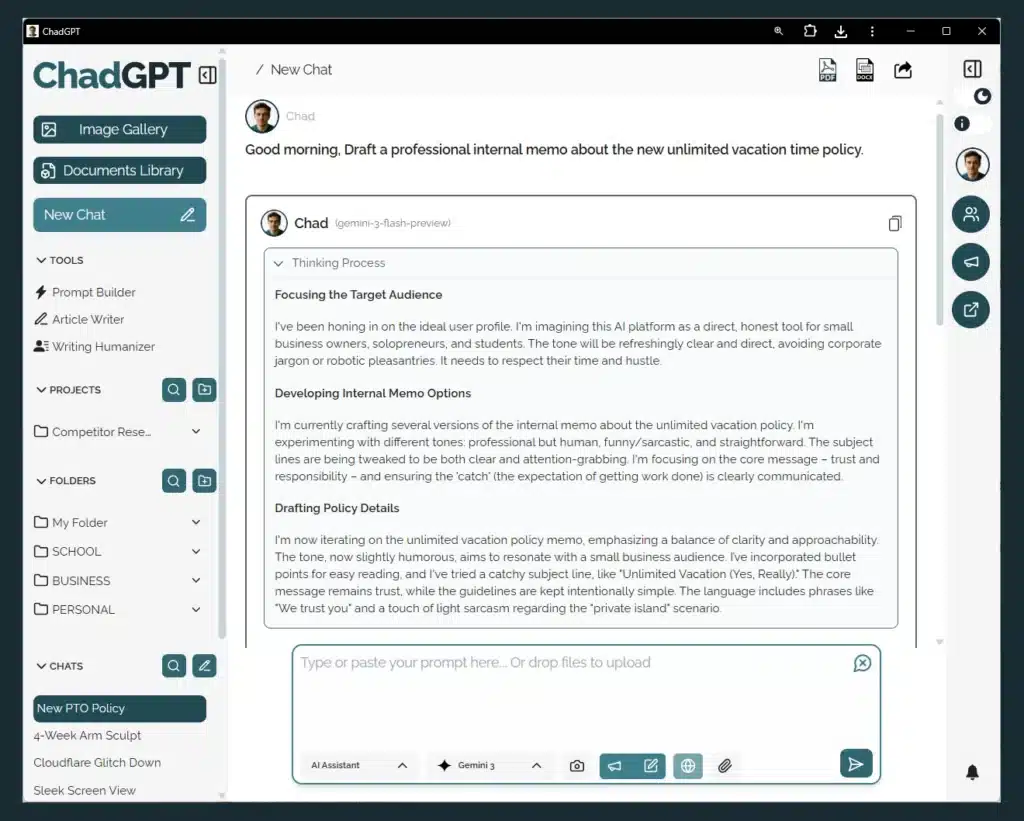
Why you’ll care:
- Show the Work: You can see the logic the AI is using. If it’s heading in the wrong direction, you’ll know exactly why.
- Better Accuracy: For complex tasks, seeing the reasoning helps you trust the result. It’s less “black box magic” and more “transparent assistant.”
- Prompt Tweaking: Seeing how the AI “thinks” makes you better at prompting. It turns out, AI is a lot like a new hire—the clearer your instructions, the better the output.
Haven’t tried the new model yet? Log in and take the new AI Assistant for a spin. No jargon, no fluff, just better tools to help you get stuff done.
— The ChadGPT Team
