Getting a Clean, Dedicated ChadGPT Window in Chrome (Like an App!)

Install ChadGPT as a Desktop App
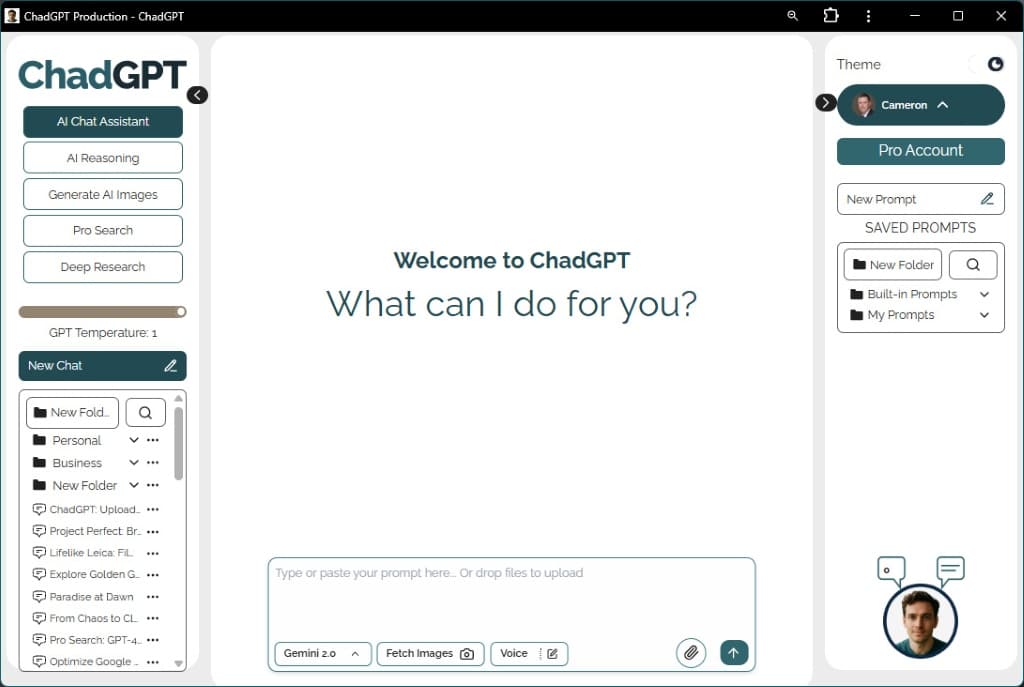
Want a cleaner, dedicated window for using ChadGPT without all the usual browser tabs, toolbars, and menus? You can easily install app.chadgpt.com like a simple desktop app using your Google Chrome browser.
Here's how:
- Go to the ChadGPT Website: Open your Google Chrome browser and navigate to:
https://app.chadgpt.com/ - Find the “Install” Option:
- Click the three vertical dots (⋮) in the top right corner of your Chrome window.
- Look near the bottom for “Cast, save and share“.
- Within that section, find and click on “Install site as app” (or sometimes just “Install app”).
- Confirm the Installation:
- A small dialog box might pop up asking you to confirm.
- Click the “Install” button in this dialog box.
- ChadGPT Opens as an App!
- ChadGPT will now automatically open in a new, separate window.
- This new window is designed to look like a dedicated application. It will NOT have the standard Chrome address bar, tabs bar, toolbars (like back/forward buttons), or main menus.
What to Expect with the App Window:
- Clean Interface: You get more screen space focused purely on the ChadGPT interface.
- No Browser Toolbars: The address bar, tab strip, bookmarks bar, etc., are all hidden.
- OS Window Controls Remain: You will still see the standard title bar at the very top of the window with your operating system’s buttons to Minimize, Maximize (or Restore), and Close the window. These are part of your computer’s system, not the browser, and cannot be removed by this method.
How to Open ChadGPT Later:
- Once you’ve installed it this way, a shortcut icon for ChadGPT will be created on your desktop or in your computer’s application launcher/start menu (depending on your operating system).
- From now on, you can just click this new shortcut icon to open ChadGPT directly in its clean, app-like window without needing to open Chrome first or find it in your bookmarks.
Enjoy a more focused ChadGPT experience!

Gemini 3 Flash in ChadGPT – A Little Faster, A Lot Smarter
You’re running a business, not a research lab. That’s why we’ve updated the default AI to Gemini 3.0 Flash to cut down on the staring-at-loading-dots time. We also added Gemini 3.0 Pro for when you need a “senior consultant” to handle the heavy lifting. Here’s the lowdown on the new speeds and why we’re finally showing you the AI’s math with the new Thinking Process display.

No More Digital Scavenger Hunts! Your New ChadGPT Document Library is Here
Ever feel like your important files vanish into the digital ether after you upload them to AI? We’ve all been there, endlessly scrolling through chats. That’s why we’re thrilled to introduce the ChadGPT Document Library! It’s your new centralized hub, bringing every file you’ve ever uploaded across all your chats, projects, and folders into one organized place. Quickly preview, download, or jump back to the original conversation for instant context.
Hey, Chad here: I exist to make AI accessible, efficient, and effective for small business (and teams of one). Always focused on practical AI that's easy to implement, cost-effective, and adaptable to your business challenges. Ask me about anything; I promise to get back to you.
One comment
Comments are closed.
[…] Works with ChadGPT in a browser window, or better, installed as a web app on your desktop. […]