

Introducing GPT‑5.1: Our New Deep‑Reasoning Engine for Serious Work

Most AI tools are great at sounding smart. Fewer are great at being smart—especially when the task is messy, multi‑step, and actually important.
That’s why we’re rolling out GPT‑5.1 inside our AI‑Reasoning suite.
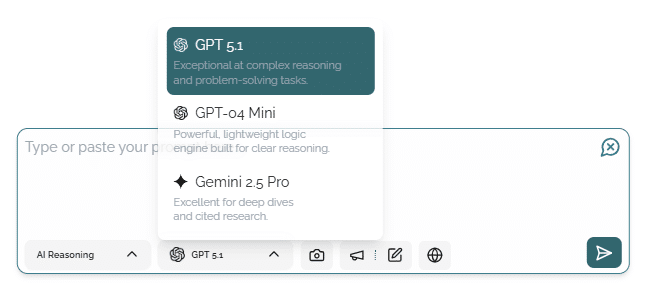
Think of GPT‑5.1 as the coworker who actually reads the whole spreadsheet, follows the multi‑step brief, and then explains the conclusion in plain English—with receipts. It’s built for real work, not just clever chat.
In this post, we’ll walk through what GPT‑5.1 is, what it can do, why it lives under AI‑Reasoning instead of AI‑Assistant, and how small teams are already using it to offload serious thinking.
What GPT‑5.1 Is (and What It’s For)
GPT‑5.1 is our new deep‑reasoning model, purpose‑built for the AI‑Reasoning section of the app. It’s designed for:
- Complex, multi‑step workflows
- Structured analysis and decision‑making
- Work where you care not just about answers, but how those answers were reached
If AI‑Assistant is your friendly “ask me anything” helper, GPT‑5.1 is the specialist you bring in when the stakes are higher and the context is heavier.
What GPT‑5.1 Can Do
GPT‑5.1 is optimized for the jobs that usually eat up your evenings and weekends. A few core capabilities:
1. Handle Multi‑Step Workflows
GPT‑5.1 can follow long, branching instructions without getting lost. It’s ideal for:
- Task and project planning
- Drafting standard operating procedures (SOPs)
- Complex troubleshooting and root‑cause analysis
You can give it a multi‑step brief—“Review this data, identify problems, rank them by impact, then give me a 30‑day action plan”—and it will work through each step in sequence, not just cherry‑pick parts of the request.
2. Work with Structured Data and Long Documents
Instead of skimming, GPT‑5.1 actually digs into your inputs. It can:
- Extract key metrics and insights from spreadsheets
- Summarize and synthesize multiple long documents
- Compare, contrast, and reconcile conflicting information
This makes it particularly useful for financial dashboards, customer feedback exports, technical documentation, and any “there’s too much here to read myself” situation.
3. Perform Stronger Step‑by‑Step Reasoning
Reasoning is where GPT‑5.1 really earns its keep. It does more than guess a plausible answer—it walks through the logic.
Use it for:
- Code reviews with explanations of what’s risky and why
- Financial or operations analysis (e.g., “What’s dragging down gross margin?”)
- Technical how‑tos or process design, with justifications for each recommendation
And when you want to understand the thinking, you can ask it to “show your steps” so the full chain of reasoning is visible.
4. Provide Clear Explanations and Audit Trails
Many workflows demand traceability, not just a result. GPT‑5.1 is designed to:
- Explain how it got from input → conclusion
- Lay out intermediate steps, assumptions, and trade‑offs
- Help you spot where you might disagree with its logic
This is especially important when you’re making financial decisions, changing customer‑facing copy, or modifying production code. You don’t just get an answer—you get something you can audit.
5. Generate Images When They Help
GPT‑5.1 also supports image generation, and we’ve integrated that directly into the experience. If:
- You explicitly ask for an image, or
- The model determines that a visual would make things clearer
…it can automatically generate an image alongside the text response.
Example: Ask it to explain a customer funnel, and it can not only describe the stages but also generate a simple funnel diagram to match.
Why GPT‑5.1 Is Better
Under the hood, GPT‑5.1 brings several key improvements over previous models:
- Stronger logical consistency
It’s less likely to jump to conclusions or contradict itself in multi‑step reasoning. - Fewer “hallucinations” on complex tasks
When the task involves calculations, constraints, or long reasoning chains, GPT‑5.1 is better at staying grounded in the actual input. - Bigger, more effective context handling
It can work with longer inputs—large documents, multi‑tab spreadsheets, and extended chat histories—and still keep track of the important details. - Higher accuracy on reasoning‑heavy problems
Anywhere you need structure (like tables, checklists, plans, or comparisons), GPT‑5.1 tends to give more reliable, actionable outputs.
In short: it’s built to think more carefully, not just talk more confidently.
Why GPT‑5.1 Lives Under AI‑Reasoning (Not AI‑Assistant)
You may notice that GPT‑5.1 isn’t sitting in the more familiar AI‑Assistant area. That’s intentional.
AI‑Assistant is optimized for:
- Quick answers
- Short copy
- Casual exploration and everyday prompts
AI‑Reasoning (where GPT‑5.1 lives) is optimized for:
- Deep analysis
- Multi‑step, chained reasoning
- Research and decision‑support workflows
We put GPT‑5.1 under AI‑Reasoning because that’s where it shines. When correctness, structure, and explainability matter more than “just give me something fast,” GPT‑5.1 is the better choice.
In practice:
Use AI‑Assistant when you want:
- A quick email draft
- A short answer to a simple question
- Light editing or brainstorming
Use AI‑Reasoning → GPT‑5.1 when you want:
- Multi‑step decisions and planning
- Calculations, comparisons, or trade‑off analysis
- Structured outputs like checklists, tables, or detailed reports
How Small Teams Are Using GPT‑5.1
Here’s how different types of small teams and solo operators can (and do) use GPT‑5.1 in real life.
Solopreneur: From Messy Spreadsheet to Clear Action Plan
Scenario: You have a messy earnings or expense spreadsheet that you haven’t had time to properly analyze.
With GPT‑5.1, you can:
- Upload or paste the data.
- Ask it to identify patterns, issues, and opportunities.
- Get back:
- A prioritized list of key insights
- A 3‑step plan to improve cash flow
- Suggested metrics to watch going forward
Instead of “I should really look at this someday,” you walk away with a concrete, data‑driven plan.
Agency Owner: Smarter Code Reviews and Implementation Plans
Scenario: Your dev team is stretched thin, and you want a second pair of eyes on code before it ships.
With GPT‑5.1, you can:
- Paste in code or link to a diff
- Ask for an annotated code review with:
- What’s risky and why
- Suggested fixes and improvements
- Rough estimates of time/effort to implement
You still make the final call—but you get a structured, reasoned analysis to start from, instead of a vague “looks fine.”
Shop Owner: Turning Feedback into a Product Roadmap
Scenario: You’re collecting feedback from email, reviews, chat, and social—but it’s scattered.
With GPT‑5.1, you can:
- Feed in customer comments from multiple channels.
- Ask it to group, rank, and prioritize.
- Receive:
- The top recurring issues and requests
- A prioritized roadmap of product or service improvements
- Suggested messaging to close the loop with customers
What used to feel like noisy complaints becomes a clear action plan for your next release or quarter.
Rollout & Access
GPT‑5.1 is available now in the AI‑Reasoning section.
- Recommended for all Pro users
- Ideal for anyone who regularly needs precise, multi‑step outputs
- Use it whenever you’re doing work that would normally require a careful human review
No special configuration needed—just choose GPT‑5.1 under AI‑Reasoning and start giving it serious tasks.
Quick Tips for Getting the Most Out of GPT‑5.1
A few simple habits can dramatically improve your results:
- Pick the right tool for the job
- For short, casual, or creative tasks → AI‑Assistant
- For deep, structured, multi‑step work → AI‑Reasoning → GPT‑5.1
- Tell it to “Show your steps”
- When you want transparency, add: “Show your steps”
- This prompts the model to reveal how it reached its conclusion, which is especially useful for analysis, decisions, or anything you need to defend to a stakeholder.
- Give it context
- The more relevant context you include (goals, constraints, examples), the better the reasoning and recommendations.
Security & Data
The rollout of GPT‑5.1 doesn’t change our data stance.
- We don’t sell your data.
- We process with trusted partners in the United States.
- You can use GPT‑5.1 for sensitive workflows under the same privacy settings you already rely on.
In other words: you get a more powerful reasoning engine without having to compromise on how your data is handled.
If you’re already using AI‑Assistant for quick work, GPT‑5.1 is the natural next step when you’re ready to hand off the heavier, more complex thinking. Try it in the AI‑Reasoning section the next time you face a task you’d normally procrastinate—and let it do the deep work for you.

One comment
Comments are closed.
Your writing has a way of resonating with me on a deep level. It’s clear that you put a lot of thought and effort into each piece, and it certainly doesn’t go unnoticed.